If you’re like me and hate sitting over group photos picking the one perfect frame where everyone (or most people) have their eyes open, you need to check out Narrative Select. It’s yet another AI revolution that may one day replace photographers in culling, but for now we can use it in our own business.
How does Narrative Select work, the app for automatic photo culling?
Narrative Select analyses every photo against 3 criteria:
- sharpness
- open eyes
- smile
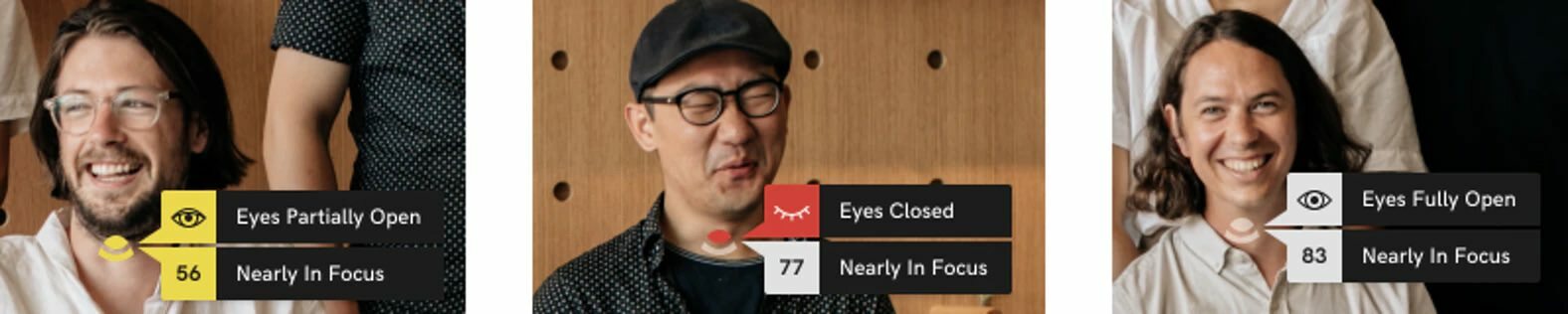
If we have several similar photos in a series, the program groups them together and flags the best of them. Of course we keep full control over the selection, because the program lets us pick and flag photos ourselves, and it even gives a close-up of every detected face.

Up to 6 free projects a month
Workflow with Narrative Select
It’s worth putting Narrative Select at the very start of your photo editing, so you can do a rough or detailed selection in it and mark the photos with ratings, which you can then import into Adobe Lightroom Classic. That way we’re already working only on the photos we picked earlier.

Loading a project into the program takes very little time, so we don’t have to waste it on generating thumbnails for all the photos in Adobe Lightroom, or on importing them into the catalog.

Speed with RAW files
The program is a bit like Photo Mechanic, because it speeds up culling even without its AI features. In 2-3 minutes it turns several thousand RAW files into preview files that are more than enough for selecting. So we don’t wait long for an import, as Lightroom tends to make us do, and we can browse hundreds or thousands of photos without lag.

What you need to run Narrative Select
Right now the program only runs on macOS and works with Adobe Lightroom CC, Lightroom Classic and Capture One (C1).
It supports all the popular RAW file formats:
CR2, CRW, CR3, NEF, NRW, RAF, DNG, RAW, RWL, ARW, RW2, ORF, FFF, 3FR, JPGS
How much does Narrative Select cost?
The Select Free version of the app offers up to 6 free projects every month, so if you’re just starting out, you don’t have to buy yet another subscription and wonder whether it will pay off. You can spend the time you save on photos or on finding new clients, and later move to the paid Narrative Select Pro plan, which differs only in having no limits and currently costs $150 a year. If you do 50 shoots a year, that’s only 3% (about PLN 10 per project). Worth it, I’d say.

Is it worth it?
You can’t beat free, so it’s worth trying. Although I don’t think the program will do the full culling for us (shots without people, without visible faces), it will definitely save us time by filtering out the worst photos in a series and suggesting the best ones. It’s a great starting point for further selection. It’s also a nice alternative to Photo Mechanic, which only comes as a trial version.


