This list is slowly going out of date, because new designs and processors keep appearing. Some of these laptops may no longer be available, and later versions can differ, because a name like HP Pavilion can hide different series (15-dk…, 15-ec…) with different model numbers (e.g. 15-dk0001nw and 15-dk0021nw), which have different components and may even have different screens.
I’m leaving the list up anyway, because you don’t always want to buy something new, and used Windows laptops get cheap fast. Series such as the Dell XPS or the HP ZBook, which start at around PLN 10,000 new, become especially affordable.
I’m refreshing this post in 2022, when computers with M2 processors have already appeared, so it’s worth taking a look at the list for 2022. If you don’t want to game on your laptop and don’t have to work in Windows, I think there are no better laptops for photo editing right now. Even if you have to spend a bit more at the start, it’s a good investment in your growth and your peace of mind, thanks to macOS.
Photo editing laptop up to PLN 4000
HP Pavilion Gaming 15-dk0021nw

You can get this laptop for about PLN 3500 without a Windows 10 licence, but you can buy one for about PLN 500, or sometimes find a good key for about PLN 150 on Kinguin.net.
This is an entry-level gaming laptop, so it has good components and good cooling. Even though it’s a gaming computer, the IPS panel has a standard 60Hz, which doesn’t matter for photography, but it has very good colours for a laptop at this price. In future we can connect an external monitor to it thanks to HDMI 2.0 and DisplayPort.
At this price we only get 8GB of RAM, but we can add a second stick, or replace it all with a HYPERX Impact 32GB 2666MHz RAM kit for about PLN 700.
On board there’s only a 256 GB SSD in the M2 slot, but inside there should be a SATA connector where you can fit an HDD or, for example, a SAMSUNG 860 EVO 1TB SSD for about PLN 700 or a SAMSUNG 860 EVO 500GB SSD for PLN 400.
- Intel Core i5-9300H, 4 cores/8 threads, clock speed 2.4 – 4.1 GHz
- 8 GB RAM 2666MHz DDR4, with one more free slot for another 8GB of RAM
- 256 GB M.2 PCIe SSD
- NVIDIA GeForce GTX 1650 4 GB graphics
- HDMI 2.0, USB-C 3.2 with DisplayPort support and USB A 3.1, Gigabit Ethernet
- Matte Full HD IPS 60Hz panel giving about 95% sRGB, delta E of 1.3 (about 1.1 after calibration!), 300 nits brightness and backlight uniformity of about 86 %
- Wi-Fi Intel Wireless-AC 9560 802.11b/g/n/ac (2×2) and a Bluetooth® 5 module, giving about 1Gb/s over Wi-Fi
Photo editing laptop up to PLN 6500
This is where the MacBook Pro M1 used to be, but I’ve written a separate post about MacBooks for photo editing.
Photo editing laptop up to PLN 8000
HP Omen 17-cb0043nw

A big laptop aimed at gamers, but it works just as well for photo editing, and even video editing, thanks to a very powerful graphics card. Unlike the Pavilion, it has a 17.3″ panel and a somewhat more interesting build, with an aluminium palm rest, a more efficient cooling system and an even better panel. It also comes with two B&O speakers.
On board we already get a 512 GB SSD in the M2 PCIe slot and a free SATA connector where you can fit an HDD or a SAMSUNG 860 EVO 1TB SSD or a SAMSUNG 860 EVO 500GB SSD as extra storage.
The laptop weighs 3.21 kg and comes with a hefty 220W power supply (as much as 330W in the RTX 2080 version), but I picked it for the screen quality and performance.
For people who are very mobile I'd probably recommend the Surface Book 2 13.5 i7-8650U/8GB/SSD256GB/GTX1050/Win10 Pro, which has weaker specs but is far lighter, at 1.5 kg in total, and you can even detach the whole keyboard, which contains an extra battery and a graphics card. It also has an incredibly bright screen (96% sRGB, 400 nits) with stylus support.
- Intel Core i7-9750H, 6 cores/12 threads, clock speed 2.6 – 4.5 GHz
- 16 GB (2x8GB) RAM 2666MHz DDR4
- 512 GB M.2 PCIe SSD
- NVIDIA GeForce RTX 2060 6 GB graphics
- Thunderbolt 3, Mini-DisplayPort, HDMI, Gigabit Ethernet, 2x USB 3.0
- 17″ matte Full HD IPS 144Hz panel giving about 96% sRGB, delta E of 1.9 (about 0.8 after calibration!), 300 nits brightness and backlight uniformity of about 91 %
- Wi-Fi Wi-Fi 6 AX 200 (2×2) and a Bluetooth® 5 module
- Windows 10 Home 64
Photo editing laptop up to PLN 12000
As I mentioned, I’d personally choose the new MacBook Pro 16, to avoid problems with colour calibration and external monitors. If that doesn’t bother us, or we want to work in Windows, we’ll find some really nice laptops that may have even better specs, with a similar weight and size. The HP ZBook 15 G6 mobile workstation weighs only 1.6 kg, and the DELL XPS 15 7590 about 2 kg, but it has an 8500 mAh battery.
Dell XPS 15 7590

- Intel Core i7-9750H, 6 cores/12 threads, clock speed 2.6 – 4.5 GHz
- 16 GB (2x8GB) RAM 2666MHz DDR4 (both slots taken)
- 1TB M.2 PCIe SSD
- NVIDIA GeForce GTX 1650 4 GB graphics
- 1x Thunderbolt 3, HDMI 2.0, 2x USB 3.1
- 15″ glossy 4K OLED panel covered with Gorilla Glass NBT, covering 100% sRGB, with brightness of over 400 nits and very even backlighting compared with LCD panels, because every pixel lights up on its own. You’ll find equally good specs in the versions with an IPS panel.
- Wi-Fi Wi-Fi 6 AX 200 (2×2) and a Bluetooth® 5 module
- Windows 10 Home 64 bit
See it on Ceneo.
HP ZBook 15 G6 laptop

HP ZBook workstations are machines for professionals. The ZBook and ZBook Studio computers are also very solidly built. Look for Dream Color models, which have the best screens for working with graphics.
- Intel Core i7-9850H, 6 cores/12 threads, clock speed 2.6 – 4.6 GHz
- 32 GB (2×16 GB) RAM 2666MHz DDR4 and still 2 free slots!
- 512 GB M.2 PCIe SSD
- NVIDIA Quadro T2000 4GB graphics
- 2x Thunderbolt 3, Mini-DisplayPort, HDMI 2.0, Gigabit Ethernet, 3x USB 3.1
- 15″ matte 4K IPS 60Hz panel giving about 97% sRGB, delta E of 4.4 (about 1.8 after calibration!), 400 nits brightness and backlight uniformity of about 90 %. There are also versions with a 700-nit panel, but I couldn’t find more precise information about it, other than that it also displays almost 100% sRGB.
- Wi-Fi Wi-Fi 6 AX 200 (2×2) and a Bluetooth® 5 module
- Windows 10 Pro 64 bit
Photo editing laptop up to PLN 15000
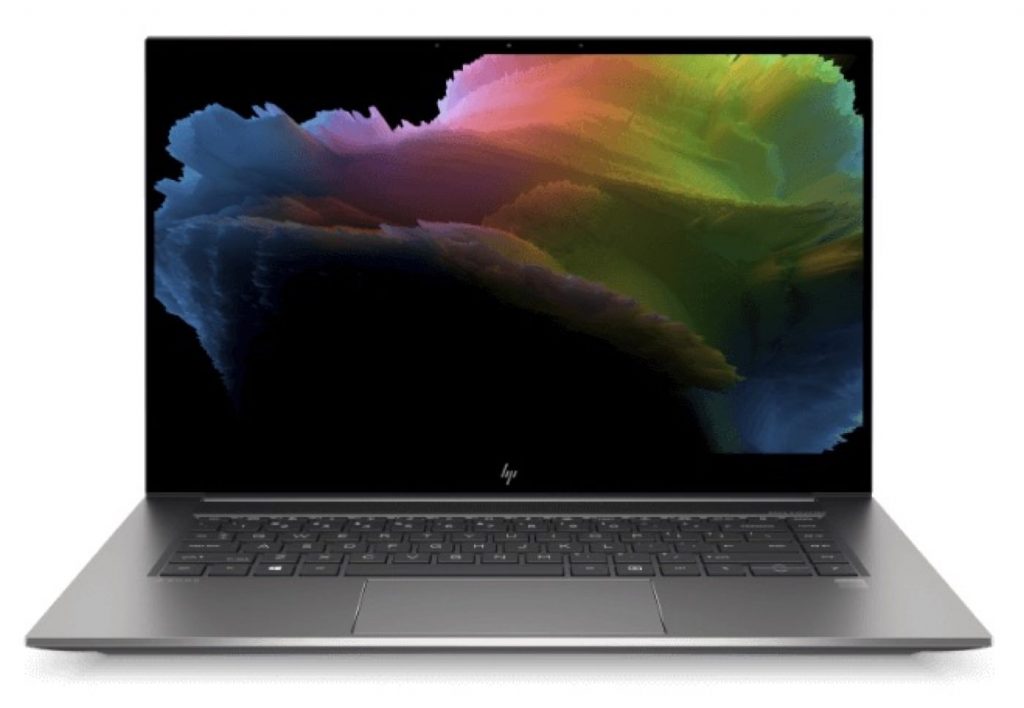
HP ZBook Studio G7 with DreamColor screen
In 2020 one of the best workstations for the creative industry hit the market. Besides the great spec I suggest here, you can also look for versions with an Intel Core i7 or with Intel Xeon processors, but that’s down to your preferences and budget. The spec below is a great rival for the 16-inch MacBook Pro, especially for people who plan to render video.
HP DreamColor 4K display
The first thing that interests us most will be the DreamColor screen, 4K UHD (3840 x 2160) IPS, offering HDR400, 100% DCI-P3, 100% sRGB and 77% AdobeRGB, with a ΔE of 1.4 and only ΔE 0.5 after calibration! The screen can also be very bright (over 600 nits) and still keeps its backlight uniformity at 92%, which puts it at the top among laptops and workstations.
HP Vaporforce Thermals
Another interesting feature is the HP Vaporforce Thermals cooling, which you’ll find only in top-end machines. Until now it was used in aviation and in very high-performance server solutions. How does it work? Instead of solid copper plates combined with heat pipes, it uses a material with a very low-pressure chamber inside, where evaporating water carries heat to a cool section, which then passes the heat through a heat pipe to the heatsinks with a fan. It’s a very efficient solution, and under load the computer reaches a temperature of about 50 degrees, which is a very good result for this spec.
On top of that, the machine has AI technology that automatically adjusts the voltage and manages component performance, so that in tasks demanding more from the processor or the graphics card, it distributes resources accordingly.
Workstations are above all reliable machines. The ZBook Studio G7 comes with a 3-year warranty, is made of aluminium and meets MIL-STD 810H standards. It also has enterprise-grade protection that machines on supermarket shelves lack, such as Sure Start BIOS protection, which restores a safe copy when it detects changes.
- InCore i9-10885H, 8 cores/16 threads, clock speed 2.4 – 5.3 GHz
- 32 GB (2×16 GB) RAM 2666MHz DDR4 in dual-channel mode (on the motherboard)
- 1TB M.2 PCIe NVMe SSD
- NVIDIA Quadro T2000 4GB graphics
- 2x Thunderbolt 3, HDMI 2.0, USB 3.1
- 15″ matte 4K IPS panel giving 100% sRGB, delta E of 1.4 (about 0.5 after calibration!), 600 nits brightness and backlight uniformity of about 92 %. (There are 3 other screen versions that are not from the DreamColor series, so it’s worth paying attention to that.)
- Wi-Fi Wi-Fi 6 AX 200 (2×2) and a Bluetooth® 5 module
- Windows 10 Pro 64 bit


This blog post provides a helpful list of laptops for photo editing, considering various budget ranges and specifications. It’s a valuable resource for those seeking affordable yet capable options, with detailed insights into each model’s features. The author’s personal recommendations add practicality to the discussion, aiding readers in making informed decisions. Great resource for photographers and creatives!